Volumetric Fog
The Reason
I am well aware that with every year that passes, D2X-XL leaps further behind current graphics technology. Its real value for me is that of an intellectual playground, a recreational area for my brain, offering me the opportunity for some mental exercises beyond my usual life and duties. I often think that I should stop wasting my time on it, but I find it fun to add some feature to it that keeps my mind busy for a while again.
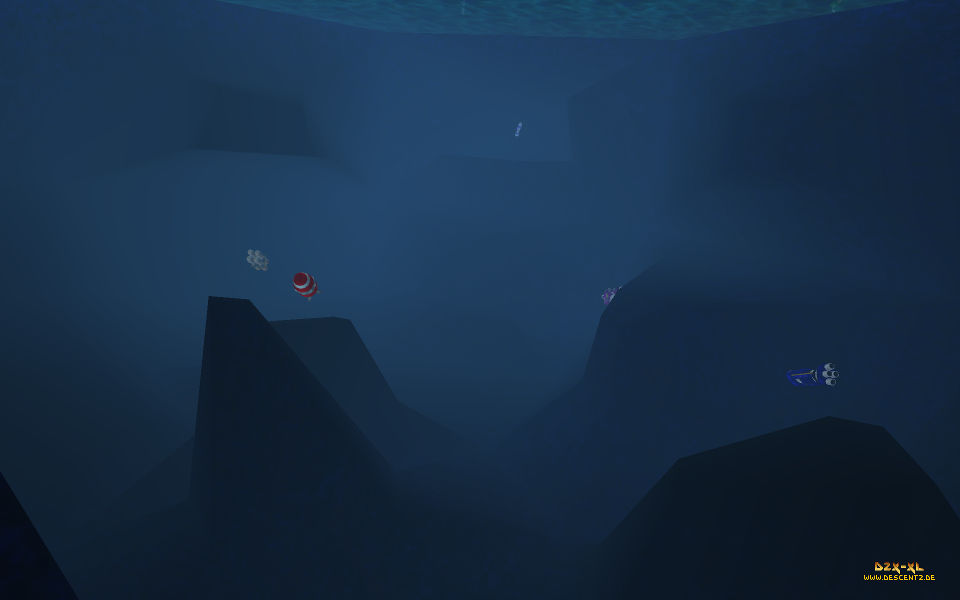
So when I looked at some underwater areas the other day, I found them sorely lacking any effect that would make them at least halfway look like an underwater area. I had once made the renderer color the confining faces of underwater and lava areas, but that wasn't too convincing an effect.
So I started to think about adding a volumetric fog effect. Volumetric basically means that it tints surfaces depending on their distance from a bounding surface delimiting an area creating the fog effect, and from the viewer eye. I hoped I would find something useful on the internet, but (as usual) I didn't. At first I thought that it would be the best simply forget about this feature, since it would be just a minor graphical touch up, but as usual with such things, I kept thinking about it until an idea for an implementation popped up. It turned out that the idea wasn't as simple to implement as I had hoped it would be, but in the end I found a way to achieve exactly what I had in mind.
The Idea
The basic idea is to render the bounding faces of fog volumes and store the minimum and maximum depth value for each screen pixel affected by fog in a texure. Fog would then be rendered as a screen space effect, only modifying the contents of the frame buffer: Each frame buffer pixel would be tested whether it was behind a fog volume front cap pixel. If so, the fog color would be alpha blended with it, with the fog color alpha increasing with the distance of the screen pixel to the fog pixel or the viewer eye, depending on what was closer. Descent's segment based engine lends itself very nicely to this approach, since it is very easy to find the bounding faces of a fog volume. The only drawback of this solution, and one that I can live with, is that it will compute too high a fog opacity for two separate fog volumes that are lined up one behind the other.
The Dead End (And The Way Out)
In C++ this would have been extremely straight forward, but you cannot read and write to the same texture in a GPU shader, making it impossible to directly compare depth values with those stored in the fog volume boundary texture and update the texture when needed. So my intriguingly simple idea looked like a dead end, but standard OpenGL came to my rescue with a few nifty functions in offered. One of them is the possibility to change the blend function that determines how colors written to the frame buffer are combined with what's already in the frame buffer. The trick was to use glBlendFunc (GL_MIN) to determine the minimum and glBlendFunc (GL_MAX) to determine the maximum z values of fog volumes. Since depth (z) values lie between 0.0 and 1.0, The frame buffer had to be initialized with 1.0 as initial minimum and 0.0 as initial maximum value. Whenever a fog rear boundary texel is written, it's depth value needs to be compared to the current maximum depth value stored in the frame buffer.
A problem with color blending is that it always affects the entire color vector, so the unneeded colors need to be masked off. Since a frame buffer has four color components (red, green, blue, alpha) and only two are needed for a fog volume, fog volume boundaries for two different types of fog (e.g. water and lava haze) can be stored in an RGBA texture. The red and blue components hold the fog volumes' minium and the green and alpha components hold their maximum depth values. Since the texture needs more precision, its components need to be float and not byte.
The Details
A fog volume's front and rear caps are rendered separately. The depth values of fog pixels need to be compared to the depth value of the corresponding screen pixels that are stored in the frame buffer. The front cap determines the minimum depth per pixel. The render buffer's red color component is used to store fog volume minimum depth values. At the start, this color component is set to 1.0 in the entire render buffer. To make the required fragment shader as simple as possible, it simply places the current fog volume texel's depth value (gl_FragCoord.z) in the fragment color (gl_FragColor), which is then passed to the render pipeline. To avoid the subsequent blending to change all color components of the corresponding pixel in the frame buffer, all colors except red are masked off (glColorMask (1, 0, 0, 0)).
Whenever a fog volume texel is rendered, the fragment shader will put its depth value in the fragment color. The fragment color is compared component wise to the frame buffer at the corresponding pixel position. If a color component of the fragment color is numerically smaller than the same color component of the corresponding frame buffer pixel, the fragment color component (which actually is the fog volume texel depth value) is written to the frame buffer. If another fog volume texel is written to the same pixel position, its depth value is compared to the depth value stored already there, and the smaller value is placed (or kept) in the frame buffer. After all fog volume front caps are processed, the frame buffer's red components contain the smallest fog volume texel depth value for each pixel that is covered by a fog volume front cap. The same procedure is executed for the fog volume rear caps, with the difference that we are now using the frame buffer's green component, which is initialized with 0.0, and that we are looking for the maximum depth value; Hence we are using the GL_MAX blend equation.
Since the fog volume depth values are rendered to a separate render buffer, the frame buffer's depth buffer is need to properly discard any fog volume texels that are behind solid geometry.
The Code
Here's some code to hopefully make the theory a bit clearer:
// bind the fog volume boundary shader program
GLhandleARB fogVolShaderProg = GLhandleARB (shaderManager.Deploy (hFogVolShader, true));
shaderManager.Rebuild (fogVolShaderProg);
shaderManager.Set ("depthTex", 0); // depth texture is bound to GL_TEXTURE0
shaderManager.Set ("windowScale", ogl.m_data.windowScale.vec); // pass the scene buffer dimension scales
ogl.SelectFogBuffer (); // make the fog volume boundary texture the render target
// set initial min and max values for fog volume boundaries
glClearColor (1.0f, 0.0f, 1.0f, 0.0f);
glClearDepth (1.0f);
glClear (GL_COLOR_BUFFER_BIT | GL_DEPTH_BUFFER_BIT);
ogl.EnableClientStates (1, 0, 0, GL_TEXTURE0);
ogl.CopyDepthTexture (1, GL_TEXTURE0); // grab the depth texture
// set the proper compare operation, color and color mask
for (int32_t nFogType = 0; nFogType < 2; nFogType++) { // handle two fog types
for (int32_t nMode = 0; nMode < 2; nMode++) { // render front and rear caps of fog volumes
if (nMode) {// render front cap, so determine min depth
if (nFogType & 1) // use blue and alpha for fog type 1
glColorMask (0, 0, 1, 0); // use blue and for fog type 1's min depth
else
glColorMask (1, 0, 0, 0);
glBlendEquation (GL_MIN);
}
else {
if (nFogType & 1)
glColorMask (0, 0, 0, 1);
else
glColorMask (0, 1, 0, 0);
glBlendEquation (GL_MAX);
}
RenderFogFaces (nFogType, nMode);
// the fragment shader
uniform sampler2D depthTex;
uniform vec2 windowScale; // conversion scales to screen coordinates
void main (void) {
if (gl_FragCoord.z > texture2D (depthTex, gl_FragCoord.xy * windowScale).r)
discard;
gl_FragColor = vec4 (gl_FragCoord.z, gl_FragCoord.z, gl_FragCoord.z, gl_FragCoord.z);
}
// the vertex shader
void main (void) {
gl_TexCoord [0] = gl_MultiTexCoord0;
gl_Position = ftransform ();
gl_FrontColor = gl_Color;
}
The Fog
Once the fog volume pixels' minimum and maximum depth values are stored in a texture, that texture can be used to modify the scene by applying fog. Another shader program reads the fog volume boundaries pixel wise from the fog volume boundary texture and compares them to the corresponding scene pixel's depth value. If the scene pixel is behind a fog volume's front pixel, that scene pixel is modified by alpha blending the fog color to it. The greater the distance of the screen pixel to the fog front pixel, the higher the fog alpha is. However, if the scene pixel is behind the fog volume's rear cap, alpha is limited by the 'thickness' of the fog volume in front of the scene pixel. Alpha is also limited by the distance of the scene pixel to the viewer if the viewer is inside the fog volume. This already hints to one tricky problem with fog volume front caps: If the viewer is inside a fog volume, parts of the fog volume's front cap may not be rendered, causing the minimum depth value for the corresponding pixels not to be stored in the fog volume boundary texture. This can however be easily determined by comparing a fog volume minimum and maximum values at any pixel position: If the minimum depth value is greater than the maximum depth value, then the front cap pixel is behind the viewer, and hence the minimum depth value is 0.0.
The More Details
Fog intensity is computed using eye space depth values, since eye space values are linear, while screen space depth values are not, making it hard to compute fog alpha independently of distance from the viewer. D2X-XL uses different opacities for different fog types, using a varying maximum distances for fog to become completely opaque. Water haze will turn opaque at 200 of the engine distance units (20 standard segments), lava will turn opaque after 40 distance units to reflect its higher density. Dense fog will turn opaque after 100 distance units, while light fog will turn opaque after 240 distance units.
The More Code
Here's the code applying fog to the scene. For the sake of simplicity, only one fog type is handled.
uniform sampler2D fogTex, depthTex;
uniform vec2 windowScale;
uniform vec4 fogColor;
// The following macros serve to compute eye depth from screen depth
#define ZNEAR 1.0
#define ZFAR 5000.0
#define NDC(Z) (2.0 * Z - 1.0)// normalized device coordinates
#define ZEYE(Z) (2.0 * ZNEAR * ZFAR) / ((ZNEAR + ZFAR) + NDC (Z) * (ZNEAR - ZFAR))
#define MAX_ALPHA 1.0
void main (void) {
float z = ZEYE (texture2D (depthTex, gl_FragCoord.xy * windowScale).r);
vec4 fogVolume = texture2D (fogTex, gl_FragCoord.xy * windowScale);
if (fogVolume.r > fogVolume.g) fogVolume.r = 0.0;// fog front cap behind viewer
fogVolume.r = ZEYE (fogVolume.r);
fogVolume.g = ZEYE (fogVolume.g);
float df = fogVolume.g - fogVolume.r;
float dz = z - fogVolume.r;
// df > 0.0 => fog volume exists here. dz > 0.0 => z is behind fog front cap
// fogColor.a contains the opacity scale
gl_FragColor = ((df > 0.0) && (dz > 0.0))
? vec4 (fogColor.rgb, min (MAX_ALPHA, min (df, dz) / fogColor.a))
: vec4 (1.0, 1.0, 1.0, 0.0);
}
The Screenshots
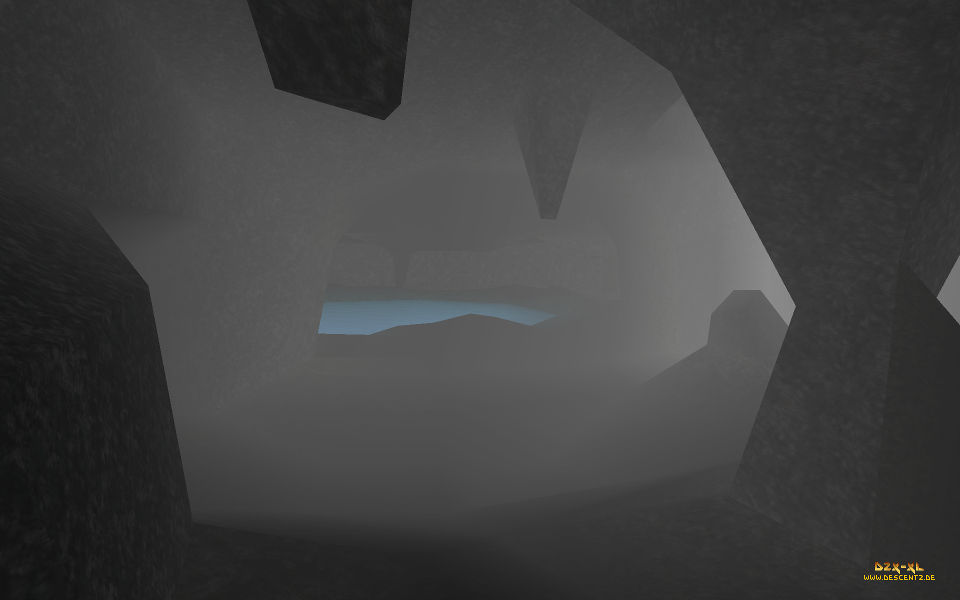
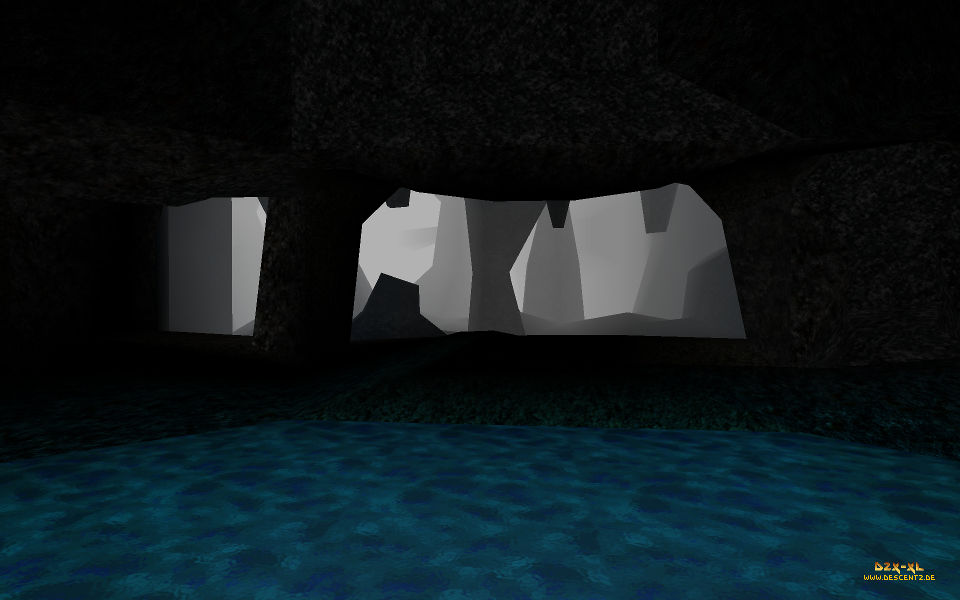
Here are some screenshots - after having gotten this far, you have deserved them: