DLE-XP - Segment Tool |
 |
|
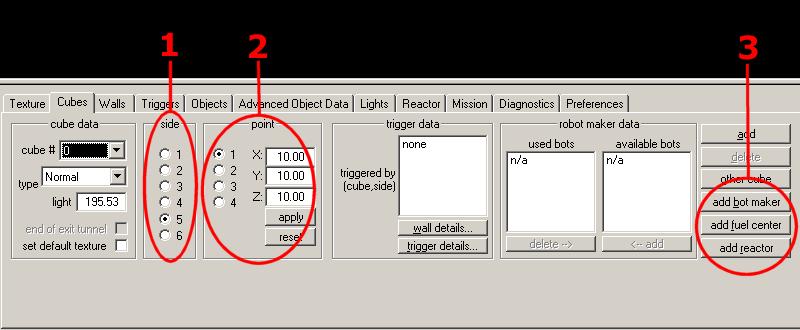
The segment tool allows to quickly find segments and depending structures (like walls and triggers), and see and change their properties. Segment tool controls
RemarksWhen deleting a segment, all triggers targetting on of that segment's sides or walls are updated appropriately. Triggers losing all targets that way will not be deleted. Use the diagnosis tool to locate them and delete or int them. You can now change a segment's type to robot maker. When making an existing segment a special segment (robot maker/fuel center/reactor), you can have the segment tool change the segment's textures to the appropriate default textures. Check 'set default texture' if you want this to be done. Repair CentersThey work like fuel centers, but replenish a player's shields. Equipment GeneratorsEquipment generators work similar to robot makers - instead of robots, you just add the powerups to be created. One difference is that equipment generators do not stop to work after a while. To influence an equipment generator's operation, have a robot maker trigger point to it. If you want the generator to work all the time, simply do not assign a robot maker trigger to it. If you assign a robot maker trigger to an equipment generator segment, the generator is turned on or off every time the trigger is operated. To enable an equipment generator once and for all in a level, you could attach such a trigger to a control panel. If you want to allow the user to turn it on and off at will, simply make the trigger indestructible. Water And LavaSegments marked as water or lava will be filled with a transparent blue or red shine. If fluid physics are enabled in D2X-XL, the appropriate sounds will be played when submerged, player ships and robots will shake a little, and all objects and weapons will be slowed down in such segments (to 66width="100%"in lava and to 75width="100%"of the regular speed in water). Additionally, objects travelling through lava segments will get damaged. Blue And Red TeamSegments marked as blue or red team are meant for team game multiplayer levels (e.g. CTF). They should contain player spawn locations - only players of the appropriate team will spawn at a team segment's spawn location. Speed BoostSpeed boost segments are meant for support of building speed boost areas and should always be used in conjunction with speed boost triggers. See the Trigger Tool for details. Blocked SegmentsBlocked segments are impassable, and D2X-XL will not spawn powerups in them. They can also be used to aid construction of speed boost areas (see the Trigger Tool for details). No Damage SegmentsObjects in no damage segments cannot fire, and shots fired from objects outside such segments cannot penetrate them. You can create safe areas in a level with this segment type. Sky BoxesDLE-XP and D2X-XL support the creation of environment boxes (sky boxes). Sky boxes can be composed of an arbitrary number of segments, so you can build any structure around a level you like. Segments of type skybox are impassable. The image shows a skybox composed of 16 segments surrounding an outside area.
 For a natural appearance of an outside area level, simply put the 'empty - light' texture at the faces composing the sky of the level. That way, a player will be able to see the sky box through, and the sky will cast light. It is recommendable to add light textures to every sky box face too - either as primary texture (chose a moving texture and put some cloud texture on top of it to make them appear to move), or as secondary texture (again, use the 'empty - light' texture. If a level with an outside area also has a subterranean area, you don't have to surround the entire level with a skybox. Instead, put an 'empty - light' texture on the skybox faces the level sticks through to avoid that face being rendered over the level. If that face is visible from the outside area, attach a 'transit' segment to it, make that segment's face the level passes through as small as possible, and only put an 'empty - light' texture to that face. In the following image, you see a tunnel extending from the level (marked red) sticking through a small 'transit' face (green). The transit segment's opposite side is attached to a large skybox face.
 Find a small sky box demonstration level with an explanatory text in the mission (.mn2) file here. Triangular Segment SidesDLE-XP and D2X-XL support segments with triangular sides. The basic operation to create a triangular segment side is to collapse the current edge (the red line of the highlighted segment) to a single point. This can be done by pressing ALT+E while the mine view has the focus (~ the mouse cursor is in the mine view). For convenience, DLE-XP offers two functions to create wedge and pyramid shaped segments. You can use the corresponding buttons in the segment tool or press ALT+W (wedge) or ALT+P (pyramid) while the mine view has the focus. To create a wedge, DLE-XP will join the current edge and the current side's opposite edge. To create a pyramid, DLE-XP will collapse the current side to a point. When collapsing segments, DLE-XP will unjoin all affected sides of the segment from any sides of other segments these are joined with. There is currently no function to expand collapsed edges and sides; you will have to rely on the undo function in order to revert a collapsed edge or side to its previous state. |
|
|
 Download